Use Cases
QR Codes for Schools & Education
Schools have a specific problem QR codes are unusually good at: paper that has to travel home in a bag, get noticed by a parent, and produce a response. Most of it doesn't. A code turns a permission slip or a newsletter into something a parent can act on in fifteen seconds — provided the destination is genuinely mobile-friendly and nobody is excluded by not having a smartphone.
The short version
- Permission slips and booking forms are the highest-value use — they replace paper that goes missing.
- Never make a code the only route. Not every family has a smartphone or data.
- Nothing behind a public code should identify a pupil — no names, photos or attendance.
- Check the destination against your data-protection policy before printing, not after.
- Use dynamic codes so a newsletter template can be reused each week.
- Classroom codes work best on the wall, not on worksheets.
What works, in order of value
Permission slips and consent forms
The clearest win. A paper slip has to survive a school bag, be spotted by a parent, be signed, and come back. A code on the letter opens the form on a phone at the kitchen table, and the response lands in a spreadsheet instead of a pile.
Keep the paper slip too — but the code will carry most of the responses, and the ones it carries arrive faster and legibly.
Parents' evening and event booking
Booking systems are usually already web-based; the friction is getting a parent from "I should book that" to the booking page. A code on the letter removes the search, the login hunt and the typo.
Newsletters
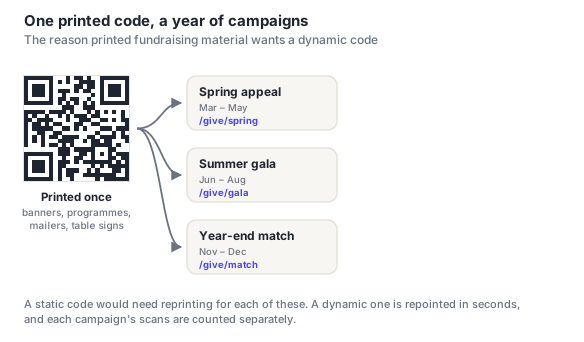
A single code in a fixed place on the printed template, repointed each week to the current issue. Saves the cost of a full print run and gives you an honest signal about whether anyone reads it.
Classroom and library resources
Codes on wall displays linking to a video, a reading list or a revision resource. These work well as part of a display and poorly on worksheets — a code on a worksheet competes with the work itself, and pupils generally can't use phones in lessons anyway.
Wayfinding for open evenings
Codes on classroom doors linking to a short subject overview, for visiting parents wandering a building they don't know. Low effort, and it lets a department say something when nobody is standing there.
Privacy and safeguarding
This is where schools need to be more careful than other organisations, and it's mostly about what sits behind the code rather than the code itself.
- Nothing reachable from a public code should identify a pupil. A code on a corridor display, a classroom door or anything visible to visitors must not lead to names, photographs, attendance or achievement data. Anything person-specific belongs behind a login.
- Check the destination platform against your data-protection policy first. A free form service is a data processor, and if it's collecting information about children it needs to be one your school has actually approved. This is the step most often skipped, because a teacher setting up a form isn't thinking about processor agreements.
- Be careful with photo galleries. A code linking to photos of a school event is fine only if consent covers it and the gallery isn't publicly indexable.
- Codes on displays are visible to visitors — parents, contractors, anyone at an open evening. Assume any code on a wall is public, because it is.
- Prefer school-domain destinations where you can. A parent can verify a link on your own domain; they can't verify a shortener.
A QR code doesn't create a privacy obligation, but it does make a destination much easier to reach — including for people you weren't picturing. Before printing, ask what happens if someone entirely unconnected to the school scans this. If the answer is uncomfortable, the destination needs a login, not a better code.
Equity: never the only route
Not every family has a smartphone, a data allowance, or English as a first language. A code that replaces a paper process rather than supplementing it excludes exactly the families least likely to complain about it.
- Keep the paper option for anything consequential — permission, consent, bookings.
- Print a short URL alongside so a parent can type it on a laptop later.
- Include an offline route: a phone number or the school office.
- Watch the deadline gap. If online responses arrive instantly and paper ones take three days, don't set a deadline that quietly penalises the paper route.
- Consider translation. If letters go out in more than one language, the destination should too — otherwise the code is only useful to some parents.
Placement and sizing
| Where | For | Size |
|---|---|---|
| Letter home / permission slip | Forms, consent, booking | 2.5–3 cm |
| Printed newsletter | Full issue online | 3–4 cm |
| Classroom wall display | Resources, videos | 8–10 cm |
| Corridor / noticeboard | Events, clubs | 10–15 cm |
| Classroom door (open evening) | Subject overview | 6–8 cm |
| School gate sign | Term dates, absence reporting | 15–25 cm |
One practical note on letters home: keep the code clear of the fold. School letters get folded into thirds, and a fold across a code — especially across a corner finder pattern — will stop it scanning. Our guide to scanning failures covers why corners specifically are unrecoverable.
Frequently asked questions
How can schools use QR codes?
The highest-value uses are permission slips and consent forms, parents' evening booking, and newsletters — all cases where paper has to travel home and produce a response. Classroom and library resource links on wall displays work well too, as does wayfinding on classroom doors for open evenings. In each case the code removes the gap between a parent deciding to act and actually being on the right page.
Are QR codes safe to use in schools?
The code is just a link, so safety depends entirely on the destination. The rules that matter: nothing reachable from a publicly visible code should identify a pupil by name, photo or attendance; anything person-specific belongs behind a login; and the platform behind the code needs to be one your data-protection policy already approves, since a form collecting information about children makes that service a data processor. Assume any code on a wall is public, because visitors can scan it too.
What if parents don't have smartphones?
Then a code must never be the only route. Keep the paper slip for anything consequential, print a short URL alongside so a parent can type it on a laptop later, and give a phone number or office contact as an offline fallback. Watch deadlines too — if online replies arrive instantly and paper ones take three days, a tight deadline quietly penalises the families least able to use the code.
Should QR codes go on worksheets?
Usually not. Pupils generally can't use phones in lessons, and a code on a worksheet competes for attention with the work itself. Classroom codes do much better on wall displays, where they're part of a resource pupils choose to use, or on materials that go home. If a worksheet genuinely needs a linked video, a short URL a pupil can type at home is more practical than a code.
Can we use one QR code for all our newsletters?
Yes, if it's a dynamic code. Put it in a fixed place on the printed template and repoint it each week to the current issue — the design never changes, and each week's scans are counted separately, which tells you something schools rarely know: whether anyone actually reads the newsletter. A static code would lock the template to one issue and need redesigning every time.