Advanced Topics
Connecting QR Scans to Google Analytics
Scan analytics tell you a code was scanned. Google Analytics tells you what happened next. Connecting them is mostly a matter of UTM parameters — but the two systems will never agree on the numbers, and understanding why is more useful than trying to reconcile them.
The short version
- Tag the destination URL with UTM parameters — that's the whole mechanism.
- Put the UTMs on the destination, not the short URL, so they survive the redirect.
- Use
utm_source=qrand put the physical placement inutm_mediumorutm_campaign. - Scan counts will always exceed GA sessions. Both numbers are right.
- A dynamic code keeps the printed code short even with long UTM strings attached.
- Consent banners break the chain, and that's the largest single gap.
The mechanism
There's no QR-specific integration to set up. Google Analytics has no idea a QR code exists — it sees a visit with campaign parameters attached, exactly as it would from an email or an ad. Your job is to make sure those parameters are on the URL by the time the browser loads the page.
So the destination URL becomes something like:
https://example.com/menu?utm_source=qr&utm_medium=table_tent&utm_campaign=autumn_menuWith a dynamic code, that tagged URL is the destination you configure — the printed code still contains only a short redirect URL, so the grid stays sparse regardless of how long the UTM string gets. That's a real advantage: tagging a static code means encoding the whole tagged URL, which produces a denser, harder-to-scan code.
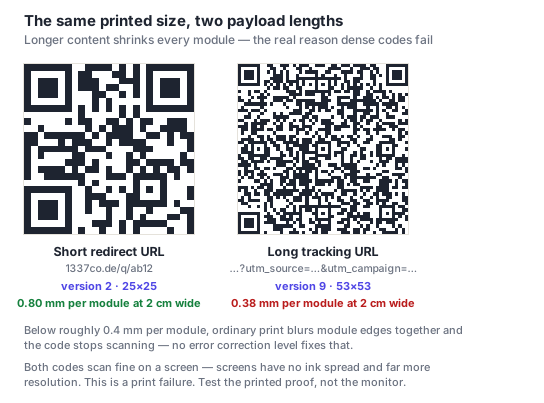
Some redirect services drop or rewrite query strings. If your UTMs are configured on the destination this is fine, but if you're appending parameters to the short URL and expecting them to pass through, test it — a redirect that silently strips them produces traffic attributed to "direct," which is indistinguishable from having no tracking at all.
A tagging scheme that survives contact with reality
UTM parameters are free text, which means they rot quickly without a convention. A scheme that works for physical placements:
| Parameter | Use it for | Example |
|---|---|---|
utm_source | Always qr — so all scan traffic is one filterable set | qr |
utm_medium | The physical placement type | table_tent, poster, packaging |
utm_campaign | The campaign or period | autumn_menu, spring_appeal |
utm_content | The specific instance, when you need to compare | store_42, window_left |
utm_term | Generally unused for offline | — |
Three conventions worth fixing early, because retrofitting them is miserable:
- Lowercase everything. GA treats
Posterandposteras different values, and you'll end up with both. - Pick one separator — underscores or hyphens, never a mix.
- Write the scheme down somewhere the next person will find it. UTM conventions are institutional knowledge that leaves with whoever set them up.
Keeping utm_source=qr constant is the highest-value part: it makes "how much traffic comes from print at all?" a one-filter question rather than an archaeology exercise.
Why the numbers never match
This causes more confusion than anything else here, and it's worth understanding rather than reconciling: your scan count will always exceed your GA sessions, sometimes substantially.
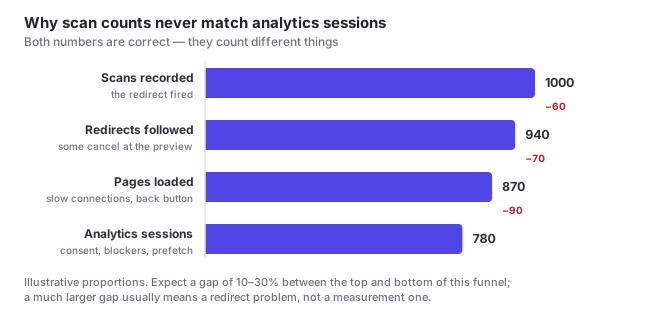
Where each gap comes from:
- Scan → redirect followed. Phones show a preview before opening. People read the URL and decide not to. Some scan out of curiosity with no intention of continuing.
- Redirect → page loaded. Poor signal, the back button, and app-embedded browsers that never finish.
- Page loaded → GA session. The big one. Ad blockers, tracking prevention, and above all consent banners — if your site defers analytics until consent, every visitor who ignores the banner is invisible to GA while being perfectly visible to your scan counter.
- Bots and previews. Link-preview fetchers can inflate scan counts without a human involved.
A 10–30% total gap is normal. Much more than that usually means a redirect problem or an aggressive consent setup, not a measurement error. Treat scan counts as reach and GA sessions as engagement; don't try to make them equal.
Attributing physical placements
The genuinely valuable thing here isn't tracking QR traffic in aggregate — it's answering which physical placement works. That needs a distinct code and a distinct tag per placement.
For a restaurant: one code on the table tent, one in the window, one on the takeaway bag, each with a different utm_medium and its own dynamic code. After a month you know which one drives visits, which is information that was previously unobtainable.
Two payoffs beyond curiosity:
- Print budget decisions stop being guesses.
- Sponsor and partner reporting becomes concrete — a scan count per placement is a saleable number.
Keep the number of distinct codes manageable. Beyond a few dozen, generating and tagging them by hand stops scaling — see APIs and bulk generation.
Practical setup notes
- Check the traffic appears under Acquisition with
qras source before you print anything. Scan your own code and look. - Watch for parameter stripping by your CMS or a canonical redirect on your own site — a trailing-slash redirect that drops the query string will quietly erase attribution.
- Don't tag internal links with UTMs; it restarts sessions and corrupts attribution.
- Set up a saved report or exploration filtered to
utm_source=qr, so the question is one click rather than a rebuild each time. - Consider a server-side redirect on your own domain if attribution accuracy matters a lot — it removes a third-party hop and keeps you in control of the short URL.
Frequently asked questions
How do I track QR code scans in Google Analytics?
Add UTM parameters to the destination URL — typically utm_source=qr plus a medium describing the placement and a campaign name. GA has no QR-specific feature; it just sees a visit with campaign parameters, exactly as it would from an email. With a dynamic code, configure the tagged URL as the destination so the printed code itself stays short and sparse.
Why don't my scan counts match Google Analytics?
Because they count different events. Scans count redirect requests; GA counts sessions that survived the preview screen, the page load, ad blockers and your consent banner. A 10–30% gap is normal and neither number is wrong — scan counts measure reach, GA measures engagement. A much larger gap usually points at a redirect stripping parameters or a consent setup blocking most visitors.
Should UTM parameters go on the QR code or the destination?
On the destination, with a dynamic code. Encoding a long tagged URL directly into a static code makes the grid denser and physically harder to scan, sometimes below the practical print floor. With a dynamic code the printed pattern holds only a short redirect URL while the destination carries the full UTM string — you get the attribution without the density cost.
Can I tell which specific poster someone scanned?
Yes, with a distinct code and a distinct tag per placement — different utm_medium or utm_content values, and a separate dynamic code for each. That's the most valuable thing this setup buys you, because it turns print spend into something measurable. Keep it to a manageable number of codes unless you're generating them via an API.
Does a consent banner stop QR traffic being tracked?
It stops it appearing in Google Analytics, which is usually the largest single gap between scan counts and sessions. If your site defers analytics until consent is granted, every visitor who ignores or dismisses the banner is invisible to GA — while still being counted by your redirect, which is server-side and doesn't depend on browser storage. That's the main reason the two numbers diverge.