QR Code Basics
QR Code Sizes & Versions
There are two different questions hiding behind "how big should my QR code be." One is about the grid — how many modules the code needs to hold your data, which the specification calls its version. The other is about physical size in millimetres. This page answers the first, with the full capacity tables for every encoding mode and error correction level, and shows how the answer sets a floor under the second. For the physical side — distance, print, DPI, on-screen — see the sizing guide.
The short version
- There are 40 versions, from 21×21 up to 177×177 modules, each adding 4 modules per side.
- Capacity depends on the version, the encoding mode, and the error correction level — all three.
- Absolute maximum: 7,089 digits, 4,296 alphanumeric characters, or 2,953 bytes.
- Module count sets the minimum printable size: (modules + 8) × 0.4 mm.
- Shortening the payload beats every other lever for making a code scan reliably.
What a "version" is
Version means grid size, not a revision number — version 40 isn't newer than version 1, it's bigger. Each version adds four modules per side, so the sequence runs 21×21, 25×25, 29×29, and so on up to 177×177.
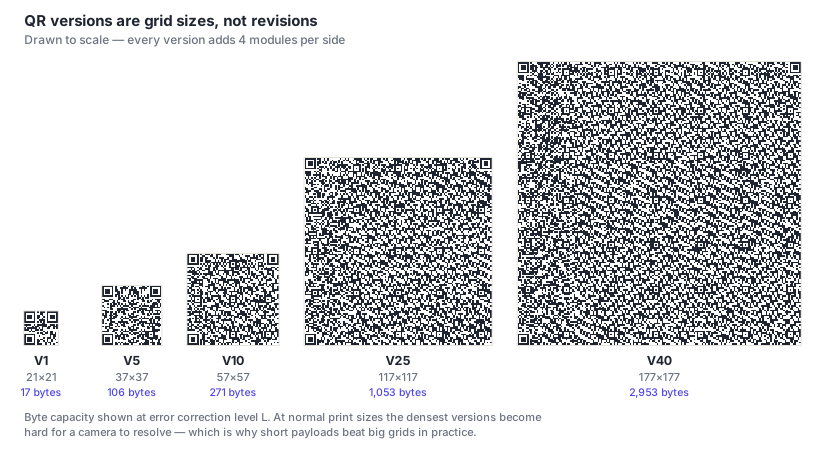
You don't normally choose a version — the encoder picks the smallest one that fits your content at your chosen error correction level. Which means the version is an output of two decisions you do control: how much data you encode, and how much redundancy you ask for.
Two structural details change with version. Alignment patterns appear from version 2 onward, and grow in number as the grid does. Version information blocks appear from version 7 onward. Both are covered in how QR codes work.
Capacity by version and encoding mode
Maximum characters at error correction level L — the most permissive level, so these are the highest figures achievable at each version.
| Version | Grid | Numeric | Alphanumeric | Byte | Kanji |
|---|---|---|---|---|---|
| 1 | 21×21 | 41 | 25 | 17 | 10 |
| 2 | 25×25 | 77 | 47 | 32 | 20 |
| 3 | 29×29 | 127 | 77 | 53 | 32 |
| 4 | 33×33 | 187 | 114 | 78 | 48 |
| 5 | 37×37 | 255 | 154 | 106 | 65 |
| 10 | 57×57 | 652 | 395 | 271 | 167 |
| 20 | 97×97 | 1,852 | 1,125 | 772 | 475 |
| 30 | 137×137 | 3,417 | 2,071 | 1,420 | 876 |
| 40 | 177×177 | 7,089 | 4,296 | 2,953 | 1,817 |
The mode is chosen automatically from your content. Numeric handles digits only and is the densest; alphanumeric covers digits, uppercase letters and a handful of symbols; byte mode covers everything else including lowercase and full UTF-8; kanji is a specialised double-byte mode. Details in how QR codes work.
Capacity by error correction level
The same versions in byte mode — the mode almost every URL and general text payload actually uses — across all four correction levels.
| Version | Grid | L (~7%) | M (~15%) | Q (~25%) | H (~30%) |
|---|---|---|---|---|---|
| 1 | 21×21 | 17 | 14 | 11 | 7 |
| 2 | 25×25 | 32 | 26 | 20 | 14 |
| 5 | 37×37 | 106 | 84 | 60 | 44 |
| 10 | 57×57 | 271 | 213 | 151 | 119 |
| 20 | 97×97 | 772 | 605 | 434 | 330 |
| 40 | 177×177 | 2,953 | 2,331 | 1,663 | 1,273 |
The useful direction is usually the reverse of how they're laid out. A typical short link — say 45 characters — lands at version 3 or 4 in byte mode at level M. A vCard with a full address is often 300–400 characters, which pushes you to version 13 or higher. That's why contact-card codes look so much denser than link codes, and why they scan worse from a business card.
From grid size to physical size
Everything above is about the module grid. Turning that into millimetres adds one more constraint: a camera has to resolve each module individually, so what matters is the printed width divided by the module count.
The practical floor is 0.4 mm per module in print. Below that, ordinary ink spread merges adjacent modules regardless of how good the source file is. That gives a simple formula, remembering that the four-module quiet zone on each side counts toward the total:
minimum width = (modules + 8) × 0.4 mm
So a version 10 code (57 modules, 65 with its quiet zone) needs about 26 mm across at minimum. If your layout has 20 mm, no amount of print quality rescues it — you need a shorter payload so the code drops to a lower version. This is the single most useful consequence of the capacity tables above: version isn't just about what fits, it's about what's printable.
The other half of the question — how big a code needs to be for the distance it'll be scanned from, plus DPI, export formats, materials and on-screen sizing — is covered in full in our print and digital sizing guide.
Frequently asked questions
What is the maximum amount of data a QR code can hold?
At version 40 with error correction level L: 7,089 numeric digits, 4,296 alphanumeric characters, 2,953 bytes of UTF-8 text, or 1,817 kanji characters. Those are theoretical ceilings, though — a version 40 code has 177 modules per side, which at any normal print size makes each module far too small for a phone camera. Codes carrying more than a few hundred characters are rarely practical.
What version will my QR code be?
You don't choose it — the encoder picks the smallest version that fits your content at your chosen error correction level. Read the tables above in reverse to predict it: a 45-character link in byte mode at level M lands around version 3 or 4, while a full vCard of 300–400 characters pushes past version 13. That's why contact-card codes look so much denser than link codes, and it's the reason payload length matters more than any other single decision.
Does making a QR code bigger let it hold more data?
No — those are independent. Capacity is set by the module grid (the version), not by physical dimensions. Printing a version 2 code at billboard size still holds exactly 32 bytes. Making it physically larger increases the distance it can be scanned from, which is a different problem from capacity.
How do I make my QR code less dense?
Shorten what's encoded — it's the only lever with no downside. Use a short URL rather than one with a long tracking string; a dynamic code is ideal here since it encodes a compact redirect regardless of how long the real destination is. After that, drop the error correction level if nothing is covering the code, and trim optional vCard fields. Uppercasing the host portion of a URL can also drop it a version by enabling alphanumeric mode.
Which encoding mode will my content use?
The encoder picks it automatically from your characters. Digits only get numeric mode, the densest. Digits plus uppercase letters and a few symbols get alphanumeric. Anything with lowercase letters, accents or arbitrary punctuation — which includes most URLs as normally written — falls to byte mode at 8 bits per character. That last transition is why writing a URL's host in uppercase can drop a code an entire version: it keeps the content inside the alphanumeric set.