Advanced Topics
QR Codes, Privacy & GDPR
Generating a QR code collects nothing. Scanning one collects nothing either — the decode happens entirely on the phone. But the moment a dynamic code routes a scan through a redirect, a log starts accumulating, and under GDPR and similar regimes that log is personal data you are responsible for. Most people using dynamic codes have never been told this, which is the main reason to write it down.
This is a practical guide to what actually gets collected and what the usual obligations look like. It isn't legal advice, and requirements vary by jurisdiction and by what you do with the data. If you're processing scan data at scale or combining it with anything else, get advice specific to your situation.
The short version
- Static codes collect nothing. No server is involved at any point.
- Dynamic codes create a log, and that log is personal data under GDPR.
- Using them makes you a controller; your provider is a processor.
- Your privacy notice should mention it. Most don't, and that's the common gap.
- Ask providers four questions before depending on them — raw IPs, retention, deletion, location.
- Generation is a separate question from tracking, and worth checking too.
Where data does and doesn't appear
It's worth separating three moments that get conflated:
| Moment | What's collected |
|---|---|
| Generating a code | Depends entirely on the generator. Client-side tools collect nothing; server-side ones receive whatever you type. |
| Scanning a code | Nothing. Decoding is local to the phone, and the camera doesn't report anywhere. |
| Following a static code | Only what the destination site itself collects — ordinary web analytics. |
| Following a dynamic code | A scan-event log at the redirect, plus whatever the destination collects. |
That third row matters more than people expect: a static QR code is privacy-neutral. It's a printed link. Nobody is counting.
The generation question
Worth checking separately, because it's invisible. A generator that renders codes on a server receives everything you encode — which for a vCard is a person's contact details, and for a Wi-Fi code is a network password. A generator that renders in the browser never transmits it at all.
1337co.de generates every QR code client-side, in your browser. Nothing you type into the generator is transmitted to, processed by, or stored on our servers unless you're signed in and deliberately save it to your library. There is no server-side rendering step to intercept. See our privacy policy for the full picture.
What a scan log actually contains
A redirect can see whatever an HTTP request exposes. In practice providers record some subset of:
- Timestamp — when the request arrived.
- IP address — this is the sensitive one. An IP is personal data under GDPR, full stop, and whether it's retained is the single biggest difference between providers.
- Approximate location, derived either from the IP or from CDN edge headers. Usually country, sometimes city.
- User agent — device type, OS, browser.
- Referrer, occasionally.
- A visitor identifier, if the provider counts "unique" scans — this is where designs differ most.
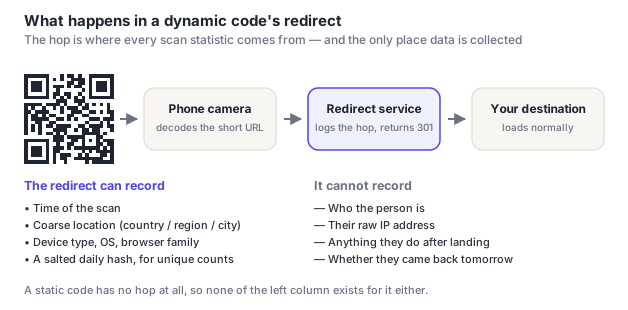
The "unique scans" number deserves scrutiny, because producing it requires recognising the same person twice — and how a provider does that determines how invasive the system is. Storing raw IPs indefinitely gives you cross-day tracking of individuals. Hashing the IP with the current date folded into the hash gives you unique counts within a day and nothing beyond it, because tomorrow the same visitor hashes to something different.
Our dynamic-code redirect never stores a raw IP address. It computes a salted SHA-256 hash of the IP scoped to the calendar date, truncates it to 16 hex characters, and stores only that. Because the hash includes the date, it rotates every midnight — unique scans can be counted within a day and the same visitor is unrecognisable the next. Geographic data comes from coarse CloudFront edge headers (country, region, city), not a precise lookup. Scan events auto-expire after 395 days via a database TTL, so retention isn't a policy someone has to remember to enforce.
The raw User-Agent string is not stored either. It's read once, in memory, to derive the three coarse buckets shown in your analytics — device type, OS, browser — and then discarded. That matters because a full User-Agent is a well-known fingerprinting signal: it can be specific enough to help re-identify a device on its own, which would undercut the point of hashing the IP in the first place. Storing only the buckets keeps the analytics useful and the record non-identifying.
We're describing our own implementation rather than a general rule — most providers do not work this way, and the point of the section below is that you should ask.
Your obligations, in practice
If you put a dynamic code on something, you decide why scan data is collected and what it's for. That makes you the controller; the QR provider is a processor acting on your instructions. The practical duties:
- Say so in your privacy notice. This is the most commonly missed step by a wide margin. A line covering scan data — what's collected, why, how long — is usually all that's needed.
- Have a lawful basis. Legitimate interests generally covers aggregate scan measurement; it gets shakier if you're identifying individuals or combining scan data with a customer record.
- Have a processor agreement with your provider. Reputable ones publish a DPA.
- Set a retention period and make sure it's actually enforced rather than aspirational.
- Know where it's processed. International transfers have their own rules.
- Be able to answer a subject access request. With properly anonymised logs this is usually "we hold nothing that identifies you," which is a good answer to be able to give.
Do you need consent?
Usually not for the scan log itself. Scanning a code is a deliberate act by the person, the redirect is technically necessary to deliver what they asked for, and aggregate measurement typically sits under legitimate interests. Cookie-consent rules generally bite on storage in the browser, and a server-side redirect log isn't that.
Where you do need to be careful: if scan data is combined with anything identifying, used for profiling or ad targeting, or if the landing page sets analytics cookies — that last one is the destination's consent problem, and it's the reason scan counts and analytics sessions diverge. See connecting scans to Google Analytics.
Four questions to ask a provider
These separate providers who have thought about this from ones who haven't, and the answers belong in your privacy notice:
- Do you store raw IP addresses, and for how long? "Yes, indefinitely" means every scan of every code you print is a retained identifier. Look for hashing, truncation or short retention.
- What's the retention period, and is it enforced automatically? A policy that relies on someone running a cleanup script is not a retention period.
- Is scan data deleted when I delete a code or close my account? Frequently not — and "we keep aggregate data" can mean more than it sounds.
- Where is it processed, and is there a DPA? Both matter for transfers and both should be answerable without a support ticket.
A fifth, if you're going to depend on this: can you export the mapping of codes to destinations? That's a continuity question rather than a privacy one, but it's the same conversation and the same providers get it wrong.
Special cases worth flagging
- Codes aimed at children. Schools and youth organisations have stricter obligations, and a code on a public noticeboard should never lead to anything identifying a child. See QR codes for schools.
- Health and religious contexts. Scan data revealing that someone attended a clinic or a place of worship touches special-category data, even if the log itself is coarse.
- Per-recipient codes. A unique code per person in a mailing turns scan data into individual behaviour tracking, which is a materially different processing activity from a poster code and should be treated as such.
- Wi-Fi codes. Not a tracking issue but a disclosure one: the network password is in plain text in the code, readable by anyone who photographs it.
- vCard codes. If they contain someone else's contact details, you're publishing another person's personal data — get their agreement.
Frequently asked questions
Do QR codes track you?
The code itself doesn't — it's a printed pattern, and decoding happens entirely on your phone with nothing reported anywhere. A dynamic code routes you through a redirect that logs the request: time, approximate location and device type, in the same way any website can. A static code has no redirect and no log. From the outside the two look identical, which is the honest problem with the question.
Is QR code scan tracking GDPR compliant?
It can be, and usually is with modest care. Scan logs contain personal data — an IP address qualifies on its own — so you need a lawful basis (typically legitimate interests for aggregate measurement), a mention in your privacy notice, a processor agreement with your provider, and a real retention period. The most commonly missed piece is simply disclosing it: many organisations use dynamic codes and never mention scan data anywhere.
Do I need consent to use a dynamic QR code?
Generally not for the scan log itself. The person deliberately scanned the code, the redirect is technically necessary to deliver what they asked for, and aggregate measurement usually sits under legitimate interests. Consent becomes relevant if you combine scan data with identifying information, use it for profiling or ad targeting, or issue per-person codes that turn it into individual tracking — and separately, your landing page's own cookies have their own consent requirements.
Does generating a QR code send my data anywhere?
Depends on the generator, and it's worth checking because it's invisible. Server-side generators receive whatever you encode — which for a vCard is someone's contact details and for a Wi-Fi code is a network password. Browser-based generators render locally and transmit nothing. This site generates client-side; nothing you type reaches our servers unless you're signed in and choose to save it.
How long should I keep QR scan data?
Long enough to be useful and no longer — for most campaign measurement that's 12 to 24 months, which allows year-on-year comparison. What matters more than the exact number is that the period is stated and enforced automatically rather than depending on someone remembering. An automatic expiry at the storage layer is far more reliable than a documented policy.