Help
Dynamic QR Codes
A dynamic QR code encodes a short, permanent 1337co.de redirect link instead of your destination directly — so you can change where it points after it's already printed, without reprinting anything. Available on Pro and Business tier.
Creating one
Design any QR type on the generator as usual, then click Save as Dynamic QR instead of (or in addition to) the regular Save. You'll get a short link like 1337co.de/q/AbCd1234 — that's what actually gets printed on the code, and it's what you'll see if you download it right after creating one.
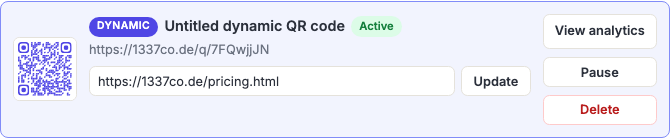
Editing, pausing, and deleting
From My Code Library, each dynamic code has its own editable destination field — change it and click Update, and every future scan of the already-printed code goes to the new destination immediately. You can also Pause a code (scanners see an inactive message instead of being redirected) and Resume it later, or Delete it permanently (this can't be undone — anyone scanning the printed code afterward sees a "no longer active" message).
How many you can create
| Tier | Dynamic QR limit |
|---|---|
| Free / Registered | Not available |
| Pro | 3 |
| Business | 10 (per person; shared team codes don't count against this — see Business Accounts) |